
Hermes Just Made Codex the Engine and Itself the Shell.
Opt-in beta in Hermes 2026.5. One slash command, three tool sources, four tools left behind.

After ~10 min reading, you will decide whether to flip the Codex runtime on and how to use every command and config immediately.
TLDR? Check this HTML interactive guide (beta), inspired from Thariq’s article.
This post was originally published on X (15 May).
Nous Research just turned Hermes Agent into a Codex front-end.
Hermes Agent keeps memory, slash commands, /goal, and skill review. Codex CLI runs shell, apply_patch, the sandbox, and native plugins.
The runtime is paid for by a ChatGPT subscription. No API key required.


Context
The feature is authored by Nous Research and titled the Codex App-Server Runtime (opt-in beta, announced May 14, 2026). Hermes Agent crossed +152K GitHub stars the same day, and per Teknium, Hermes’ daily token volume now runs at roughly twice OpenClaw’s (+353B vs +195B as of May 15).
The feature ships in Hermes v0.13.0 (tag v2026.5.7, May 7, 2026) and requires Hermes 2026.5+ and Codex CLI 0.130.0+. Both projects are open-source: Hermes under MIT, Codex CLI under Apache-2.0. The swap targets the OpenAI provider path specifically (openai/* and openai-codex/*) and does not touch Anthropic, Gemini, or any other non-OpenAI provider.
A Reminder: Hermes Agent is a self-improving coding agent with sessions DB, persistent memory, skill review, slash commands, multi-agent Kanban, and the /goal Ralph loop. Codex CLI is OpenAI’s terminal coding agent: sandboxed shell, structured patches, native plugins. Until last week the two were separate ecosystems.
What the Codex App-Server Runtime is
When the runtime is on, Hermes hands openai/* and openai-codex/* turns to the Codex CLI app-server over JSON-RPC stdio. Codex executes the tool loop: terminal commands, file edits, MCP tool calls, sandboxing. Hermes keeps the surrounding session: sessions DB, slash commands, gateway, memory, and skill review.
Default Hermes behavior is unchanged unless the flag is flipped. Hermes never auto-routes onto this runtime.
OpenClaw shipped a similar runtime-swap pattern earlier this year. Hermes’ differentiator is the bidirectional MCP callback that keeps Hermes’ richer tools (browser, vision, skills, TTS) accessible from inside the Codex turn.
How it works
Three tool sources are available the moment the runtime starts.
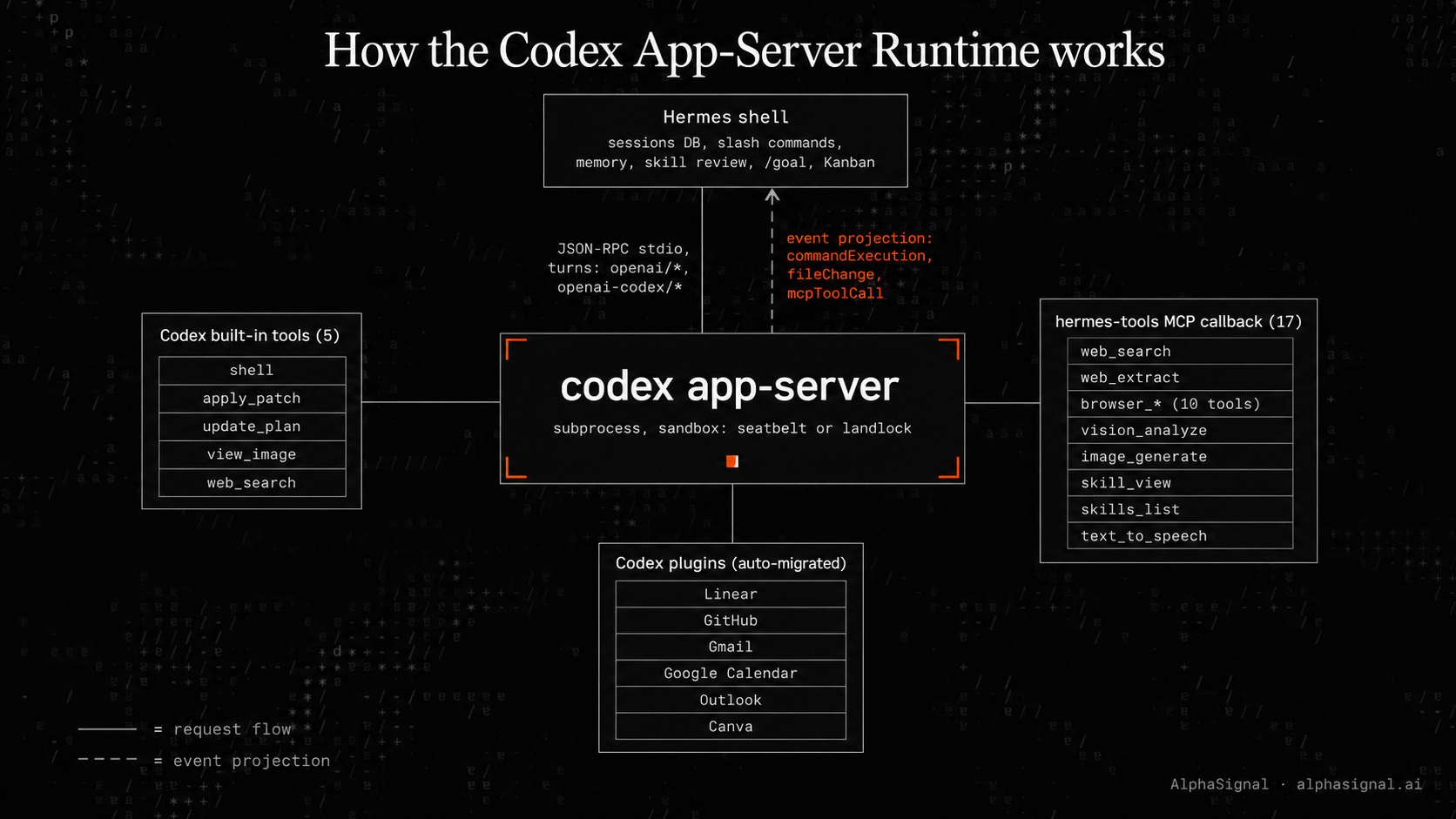
Codex built-in tools (5):
shell runs terminal commands inside the sandbox (read, write, search, find, run). apply_patch applies structured multi-file diffs. update_plan is Codex’s in-runtime todo tracker. view_image loads a local image into the conversation. Codex’s own web_search rounds out the set. All five run native, all five run inside the sandbox profile.
Auto-migrated Codex plugins:
When the runtime is enabled, Hermes queries Codex’s plugin/list RPC and writes a [plugins.”<name>@openai-curated”] entry for every plugin already installed via codex plugin install. Linear, GitHub, Gmail, Google Calendar, Outlook, Canva: whatever the user authorized in Codex’s TUI is now live inside the Hermes session, no re-config.
Hermes MCP callback (17 tools):
For tools Codex doesn’t ship with, Codex spawns hermes_tools_mcp_server as a stdio MCP subprocess and calls back into Hermes. The callback exposes web_search and web_extract (Firecrawl), ten browser-automation tools, vision_analyze, image_generate, skill_view, skills_list, and text_to_speech.
Event projection keeps memory and skill review alive:
Codex emits commandExecution, fileChange, mcpToolCall, and dynamicToolCall notifications. Hermes projects each one into a synthetic assistant tool_call plus tool result message, so the background review fork sees a normal-looking transcript. Memory nudges fire every 10 user prompts, skill nudges every 10 tool iterations.
The review fork itself downgrades to codex_responses (same OAuth, Hermes owns the loop) so it can still call memory and skill_manage. The downgrade is invisible to the user.
How to get started
For permission overrides, aux-task routing, and safe config editing, see How to use it at the end.
1. Install Codex CLI (0.130.0+):
npm i -g @openai/codex
codex --version
2. Authenticate Codex against the ChatGPT subscription:
codex loginTokens land in ~/.codex/auth.json. Hermes will not share OAuth state with Codex CLI (the split is deliberate, to avoid clobbering each other on refresh), so users still need hermes auth login codex separately if they haven’t.
3. (Optional) Install Codex plugins:
codex plugin marketplace add openai-curated
codex plugin install linear github gmail calendar
Whatever’s installed at runtime-enable time gets auto-migrated.
4. Flip the runtime on inside Hermes:
/codex-runtime codex_app_serverThat single command verifies the Codex CLI install, migrates user MCP servers from ~/.hermes/config.yaml to ~/.codex/config.toml, discovers installed Codex plugins, registers Hermes as an MCP server, and writes default_permissions = “:workspace”. Takes effect on the next session.
Synonyms: /codex-runtime on, /codex-runtime off, /codex-runtime auto (back to Hermes default).
For permission overrides, aux-task routing, and safe config editing, see How to use it at the end.
What works, what doesn’t
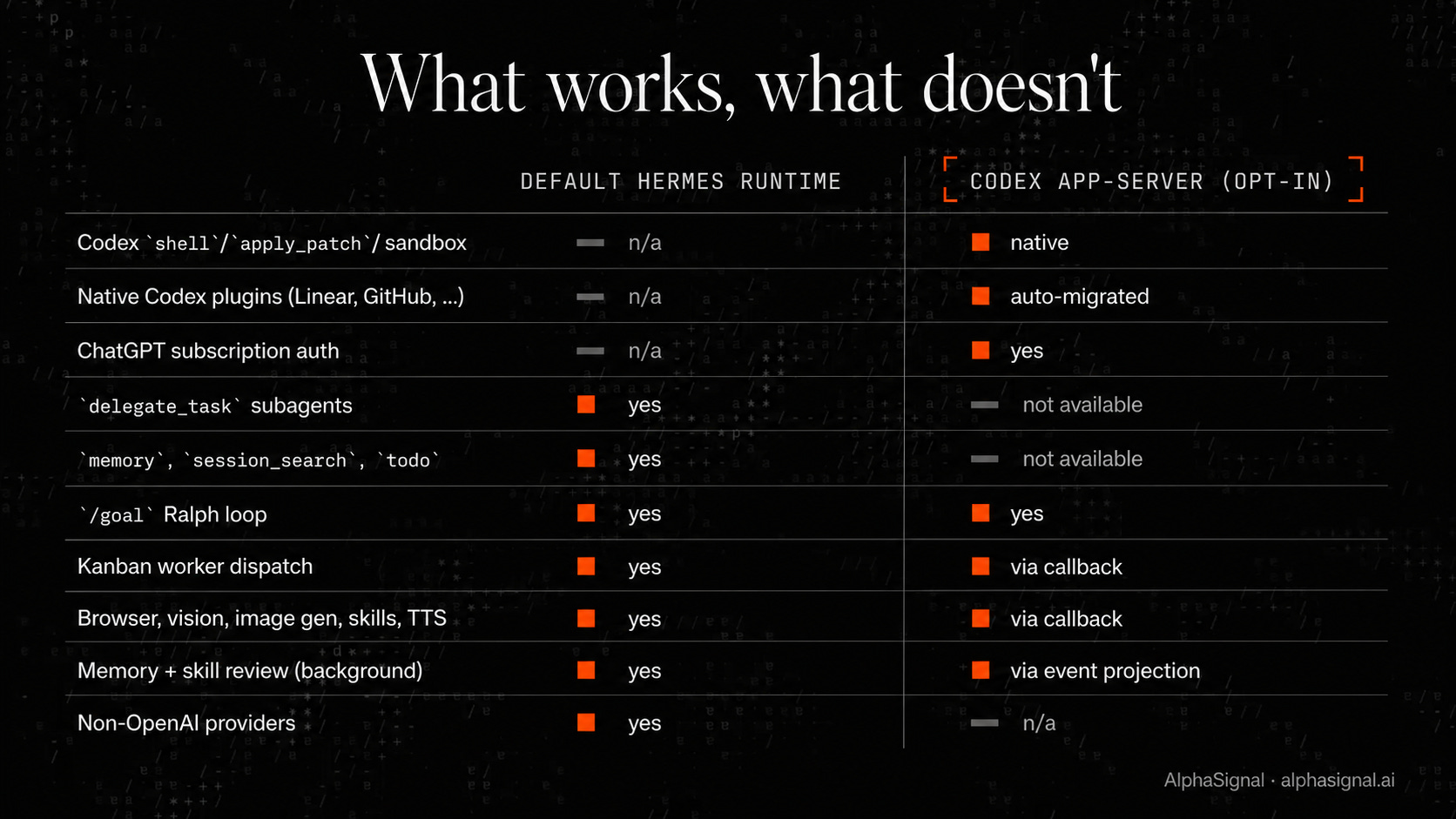
The four agent-loop tools (delegate_task, memory, session_search, todo) need running AIAgent context that a stateless MCP callback can’t drive. Switch back to /codex-runtime auto when any of them is needed mid-loop.
Use cases
Multi-file refactors and migrations. Codex’s structured apply_patch runs sandboxed multi-file diffs. Hermes’ /goal Ralph loop keeps the migration on-target across turns, and Checkpoints v2 rolls back failed iterations.
Debugging flaky ML pipelines. Codex inspects logs, edits training scripts, and reruns commands inside seatbelt or landlock. Hermes’ background skill review captures the successful fix as a reusable skill for the next incident.
Dependency hell on fresh environments. Codex’s sandboxed shell installs packages, runs build smoke tests, and resolves CUDA or version conflicts. Hermes’ memory remembers which configurations succeeded across projects.
CI and test repair sweeps. Codex patches failing tests file by file inside the workspace sandbox. Hermes’ Kanban dispatches each failure to a worker, with heartbeat, reclaim, and zombie detection from the Tenacity Release handling stalls.
Multi-service integration work. Codex executes against migrated MCP servers and the auto-installed plugins (Linear, GitHub, Gmail, Calendar). The MCP callback brings Hermes’ browser automation and vision into the same turn.
Current Limitations
Four agent-loop tools unavailable. delegate_task, memory, session_search, and todo need running AIAgent context that a stateless MCP callback can’t drive. Workflows that depend on subagent spawning or mid-loop memory lookups require switching back to /codex-runtime auto.
Two separate auth sessions. codex login and hermes auth login codex are independent. Users assuming one covers both will hit auth errors. The split is deliberate, not a bug: Hermes will not share OAuth state with Codex CLI to avoid token-refresh races.
ChatGPT rate limits absorb auxiliary tasks. Title generation, context compression, vision auto-detect, session search summarization, and the background self-improvement review fork all flow through the same ChatGPT subscription by default. Plus-tier users on heavy sessions will eat their cap unless they route aux tasks to a cheaper model via auxiliary.title_generation and related config overrides.
Performance claims are anecdotal. Teknium’s “~5% improvement in GPT coding capabilities” and one community user’s “p95 latency cut in half on long-lived sessions” came from reply threads, not benchmarks. No formal eval comparing the default Hermes runtime to the Codex runtime on identical workloads exists at publication.
Cron and sub-second cancellation not guaranteed. Cron jobs run through the same code path but are not specifically tested. Mid-stream Ctrl+C is sent via turn/interrupt but will not always land if Codex already flushed the final message. Approval prompts may also fall back to a reason string when fileChange data has not streamed yet.
So the best recommendation is to flip the runtime on for shell, patch, sandbox, and plugin-heavy work, and flip it back for anything that needs subagents or mid-loop memory.
AlphaSignal Take
The runtime swap is the right abstraction. Memory nudges fire identically through event projection. Kanban workers report back through the MCP callback. The flag is reversible in one command. For users whose work is dominated by shell, structured patches, and Codex plugins, the upgrade is real, and the cost is a ChatGPT subscription users were probably going to pay anyway.
The four unavailable tools are not a minor gap. They cover Hermes’ most differentiated capabilities (subagent spawning, persistent memory). The two-auth UX will trip first-time users. The 5% coding boost is a reply-thread anecdote, not a benchmark. The auxiliary-task billing default will surprise Plus-tier users running long autonomous sessions until they read the docs section nobody reads.
Verdict: Worth Watching, not Production Ready. The verdict moves to Production Ready when the four agent-loop tools get an MCP-callback equivalent, the two-auth flow is unified, and a published benchmark replaces the reply-thread estimate. Likely candidate: Hermes 2026.6.
Who benefits
Hermes users on OpenAI doing real repo work (multi-file edits, builds, terminal-heavy debugging, CI sweeps), engineers on ChatGPT Plus or Pro who would rather not maintain a separate OpenAI API billing surface, and teams whose Codex plugin install (Linear, GitHub, Gmail, Calendar) is already configured.
It does not fit workflows that lean on delegate_task subagents or cross-session memory mid-loop, anyone on a non-OpenAI provider, Plus-tier users running long autonomous loops who have not routed auxiliary tasks elsewhere, or teams that depend on cron jobs for memory-driven automation.
Practitioner implication
Hermes users on OpenAI can now run sandboxed shell and structured patches inside seatbelt or landlock, paid for by a ChatGPT subscription, with memory, skill review, and /goal intact.
Links
Codex App-Server Runtime (Hermes Agent docs) (full feature spec, ~12 min read)
Hermes Agent GitHub (repo, MIT, ~2 min setup with hermes update)
Codex CLI on npm (install: npm i -g @openai/codex, ~1 min)
Hermes Agent v0.13.0 release notes (Tenacity Release, ~6 min read)
Follow @AlphaSignalAI for more content like this.
Subscribe at AlphaSignal.ai for daily AI signals. Read by 300,000+ subscribers.
How to use it
A command and config reference for the everyday workflow once the runtime is on.
Toggle the runtime.
/codex-runtime codex_app_server   # enable (or `on`)
/codex-runtime auto               # back to default Hermes runtime (or `off`)
/codex-runtime                    # check current state without changing
The toggle takes effect on the next session, so the current cached agent finishes its turn on the prior runtime. Prompt caches stay valid.
Approve commands as Codex runs.
When Codex wants to execute a shell command or apply a patch, Hermes shows its standard Dangerous Command prompt with three responses: Allow once, Allow for this session, Deny. The session option caches similar commands, so the model does not re-prompt for the same kind of operation. Deny rejects the command, and Codex continues in read-only mode.
Change the sandbox profile.
Three built-in profiles ship with Codex: :read-only (no writes, every command prompts), :workspace (writes inside the workspace, no prompt, Hermes default), and :danger-no-sandbox (sandbox off, not recommended). Override the default in ~/.codex/config.toml outside Hermes’ managed block:
default_permissions = “:read-only”Hermes preserves user overrides on re-migration. The override only changes the default, per-command approvals still respect the prompts.
Route auxiliary tasks to a cheaper model.
By default, title generation, context compression, vision auto-detect, session search summarization, and the background self-improvement review fork all flow through the ChatGPT subscription. To save the subscription rate limit for actual coding turns, route aux tasks elsewhere in ~/.hermes/config.yaml:
auxiliary:

  title_generation:

    provider: openrouter

    model: google/gemini-3-flash-preview

  context_compression:

    provider: openrouter

    model: google/gemini-3-flash-preview

  vision_detect:

    provider: openrouter

    model: google/gemini-3-flash-preview

  session_search:

    provider: openrouter

    model: google/gemini-3-flash-preview

  goal_judge:

    provider: openrouter

    model: google/gemini-3-flash-preview
This is the single highest-value tweak for anyone running long autonomous sessions on a Plus plan.
Edit ~/.codex/config.toml safely.
Hermes wraps everything it manages between two marker comments. Anything outside the markers is yours and stays put across re-migrations. Anything inside gets clobbered on the next toggle. Use the space outside the managed block for custom MCP servers, sandbox overrides, model preferences, or user-defined permission profiles in [permissions.<name>] tables.